
Checkster Blog
Featured Article
Form Builder vs. Workflow Automation: Do You Need Both?
Form Builder vs. Workflow Automation
As we navigate the digital landscape of 2026, the distinction between "collecting data" and "managing a process" has become the defining line between surviving and thriving. For years, businesses have relied on a fragmented tech stack: one tool to build a form, another to manage tasks, and a third to track compliance. This fragmentation often leads to data silos, manual errors, and a general lack of visibility.
The central question facing operations managers today is whether they need a standalone online form builder, a dedicated workflow automation tool, or a hybrid system that bridges the gap. To answer this, we must look beyond the surface of digital forms and understand how data moves through an organization.
Understanding the Online Form Builder
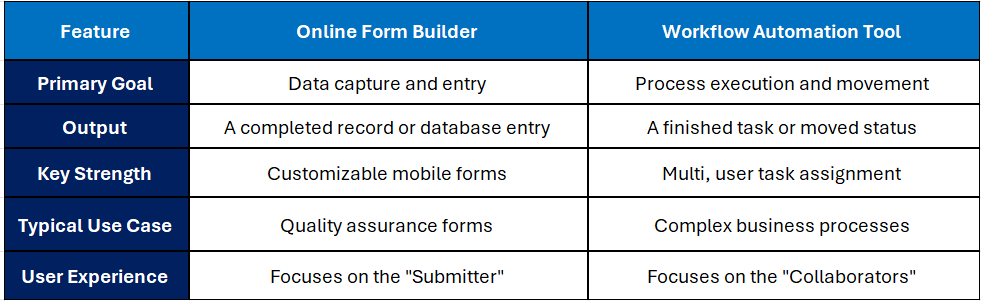
At its core, an online form builder is designed for data entry. It is the digital evolution of the paper clipboard. These tools are excellent for capturing information from a user, whether that is a customer, an employee, or a field technician. A high-quality saas form builder allows you to create customizable mobile forms that can be deployed instantly to any device.
For many businesses, the primary goal is secure data collection. Whether you are gathering sensitive information via employee onboarding forms or conducting a quick poll, the focus is on the interface and the storage. However, a traditional online form builder often stops once the "submit" button is pressed. The data sits in a database, waiting for a human to download it, analyze it, and decide what to do next.
The Rise of the Workflow Automation Tool
If a form builder is the "input," a workflow automation tool is the "engine." It is less concerned with how the data looks and more concerned with where it goes. Workflow automation is about creating a series of triggers and actions that move a project from point A to point B without manual intervention.
In a professional setting, this might look like multi-user task assignment. When a specific field in a form is filled out, the automation tool instantly assigns a follow-up task to a manager or triggers a notification to another department. It turns static information into an active process.
Comparing the Two: A Tactical Breakdown
Do You Need Both? The Checkster Perspective
The reality for most modern enterprises is that choosing one or the other creates a bottleneck. If you only have an online form builder, your data is "dead" the moment it is submitted. If you only have a workflow automation tool, you struggle to capture high-quality, structured data from the field.
This is why the checkster app was designed as a unified solution. By combining Checkster online forms with powerful Checkster checklist software, businesses no longer have to choose between capture and action.
1. Beyond Digital Paper
Standard digital forms often fail when they hit the real world. A technician in a basement or a supervisor in a remote warehouse cannot rely on a constant internet connection. Checkster prioritizes offline data capture, allowing users to fill out offline forms that sync automatically once a connection is restored. This makes it a true paperless inspection solution for industries where "online, only" isn't an option.
2. Documenting and Executing SOPs
Most businesses have Standard Operating Procedures (SOPs), but few have a way to enforce them. Using an integrated sop builder allows you to document & execute sop within the same interface. Instead of a dusty manual on a shelf, your SOP becomes a living productivity checklist app that guides the user through every step of a process.
3. Audit and Compliance Mastery
For industries dealing with iso compliance/forms or hospitality compliance, the stakes are too high for fragmented tools. You need an audit and compliance software that not only captures the data but also provides a timestamped, unalterable trail of who did what and when. This is where the combination of mobile inspection software and secure data collection becomes vital.
Real, World Scenarios: When Both Tools Work as One
Hospitality Compliance
In a restaurant setting, a manager might use the checkster app to complete daily quality assurance forms. If a fridge temperature is marked as "out of range," the workflow automation features immediately trigger a multi, user task assignment to the maintenance team. The form didn't just record a problem; it started the solution.
Manufacturing and Inventory
Managing a shop floor requires more than just inventory tracking checklists. It requires a system that understands the relationship between parts, people, and time. By using checkster checklist software as a paperless inspection solution, manufacturers can track machine health and instantly automate the reordering process when supplies run low.
Human Resources and Onboarding
Employee onboarding forms are notoriously document, heavy. By utilizing electronic signature forms within a structured workflow, HR teams can ensure that every document is signed, filed, and moved to the next department without a single email being sent manually.
The Benefits of a Unified Tech Stack
When you move away from separate tools and embrace a unified platform like Checkster, you unlock several key advantages:
- Elimination of "Data Fatigue": Staff only need to learn one interface for both forms and tasks.
- Accuracy through Offline Forms: Use offline data capture to ensure that data is recorded the moment it is observed, not hours later when details are forgotten.
- Enhanced Productivity: A productivity checklist app that actually moves the needle by automating the "busy work" of follow, ups.
- Security and Integrity: Centralizing your secure data collection ensures that sensitive information isn't floating around in unencrypted email attachments.
Conclusion: The Hybrid Advantage
So, do you need both an online form builder and a workflow automation tool? The answer is a resounding yes, but you don't necessarily need two different subscriptions.
The future of operations lies in platforms that treat forms and workflows as two sides of the same coin. By leveraging checkster online forms to capture high-quality data and Checkster checklist software to manage the resulting tasks, you create a seamless, efficient, and audit, ready organization.
Whether you are looking for a simple saas form builder or a comprehensive audit and compliance software, the goal remains the same: to turn your information into action.